Showing posts with label Windows 2000. Show all posts

Wednesday, 16 May 2012

GetDataBack for NTFS


Publisher’s Description

From Runtime Software:
GetDataBack is highly advanced data-recovery software that will help you to get your data back when your drive’s partition table, boot record, Master File Table, or root directory is corrupted or lost, when a virus hits the drive, when files have been deleted, when the drive has been formatted, or when the drive has been struck by a power failure. GetDataBack can even recover your data when the drive is no longer recognized by the operating system or not only the root directory but all directory information is lost. Advanced algorithms will make sure all directories and subdirectories are put together as they were, and that long filenames are reconstructed correctly. GetDataBack is safe because it’s read-only, which means the program will never attempt to write to the drive you’re about to recover.

ITUOnline Editors’ review

Accidentally deleted your files? GetDataBack Data Recovery can track them down–for a price. It even works with corrupted drives and those not recognized by Windows. This version only recovers files from NTFS drives, but it does offer a search tool for quickly locating a file by its date, name, or size.

If you suspect your actual disk is about to bite the dust, you can create a drive image to use during recovery. The utility can’t make rescue discs, however, so if you want to do that, you’ll need to build yourself a bootable Windows PE disc and add GetDataBack Data Recovery to it–the publisher’s Web site has instructions.

Although the application proves quite adept at locating deleted files, and you can view their contents, the demo won’t recover them. We can’t vouch for how well this core feature works. GetDataBack Data Recovery seems worth trying, but if you actually want to recover any lost work, this demo won’t do you much good.

Thursday, 8 September 2011

utorrent


Publisher's Description

From BitTorrent:


uTorrent is a powerful and efficient BitTorrent client for Windows. Most of the features present in other BitTorrent clients are present in uTorrent, including bandwidth prioritization, scheduling, RSS auto-downloading, and Mainline DHT. Additionally, uTorrent supports the protocol encryption joint specification and peer exchange. Unlike many torrent clients, it does not hog valuable system resources--typically using less than 6MB of memory, allowing you to use the computer as if it weren't there at all.

ITUOnline Editors' review


Small enough to run off a USB key, but powerful enough to download any torrent in a jiffy (if it's got enough seeders), uTorrent 2.0 is easy on the eyes and smart on your network. The memory footprint for uTorrent is very small, and system resources are barely touched. While you're torrenting, you shouldn't be surprised to find that other programs that use your Internet connection slow down, but the latest version of uTorrent has an answer to that. Called uTorrent Protocol, or uTP, it's a built-in throttling that detects network congestion and slows down the torrent until the traffic jam has dissipated.
Version 2.0 includes a transfer cap, so that users who have had limits imposed by their ISPs can keep track and automatically kill torrenting when that limit is reached. Skins have also been introduced, but there's no skins option in Preferences: instead, you must go to the uTorrent site and download and install them yourself. That's unnecessarily irritating.
The most difficult aspect of using a torrent client is still finding the torrents, but included are both a torrent search bar and a handy RSS feed download function. Subscribe to select feeds, and uTorrent automatically downloads files as they publish. Adding, starting, pausing, and listing torrents takes merely a click each. A speed guide helps you test your ports and adjust system settings for optimal performance, although watch out for the opt-out Ask.com toolbar when you install. Combined with Local Peer Discovery and DHT Network options, and Teredo and Ipv6 support, uTorrent should be the torrent program of choice for novices, intermediate, and advanced users.

Sunday, 24 July 2011

Norton Ghost


Publisher's Description

From Symantec:

Norton Ghost is a comprehensive disk imaging solution for home and small office users. Enhanced with Drive Image technology, which Symantec obtained through the acquisition of Power-quest Corporation, Norton Ghost offers consumers the ultimate solution in data storage and protection with a complete, reliable, quick and easy way to backup system files, programs, settings, documents and other important data.

With Norton Ghost, users can now create backup images without restarting their computer or exiting Windows through the product's hot imaging technology. Imaging takes place in the background without interruption, allowing users to continue work on their system as the backup takes place. Users also benefit by saving valuable time and storage space with Norton Ghost's incremental backup and restore feature. Once an initial image of a hard drive is completed, users can make future backups incrementally - updating only the files and information that have changed rather than backing up the entire hard drive again. In the event it is necessary to restore data, users can choose to restore the entire system or just specific files or folders.

Sunday, 6 March 2011

7-Zip


Publisher’s Description

From 7-Zip Software:


The main features of 7-Zip: High compression ratio in new 7z format with LZMA compression. Supported formats: Packing / unpacking: 7z, ZIP, GZIP, BZIP2 and TAR; Unpacking only: ARJ, CAB, CHM, CPIO, DEB, DMG, HFS, ISO, LZH, LZMA, MSI, NSIS, RAR, RPM, UDF, WIM, XAR and Z. For ZIP and GZIP formats 7-Zip provides compression ratio that is 2-10 % better than ratio provided by PKZip and WinZip. Self-extracting capability for 7z format. Integration with Windows Shell. Powerful File Manager. Powerful command line version.
ITUO Editors’ review

It’s easy for Windows users to forget that WinZip isn’t the only file-compression utility in the world. Like its better-known competitors, the free 7-Zip unpacks a host of archive formats, including ZIP, TAR, GZ, and its own 7z format. Unlike WinZip, though, it can create TAR and GZ archives, which are commonly used on Unix and Linux systems.

The program’s ability to shrink files was stunning. In our tests, 7z archives were up to 40 percent smaller then their ZIP equivalents, although compression did take longer, and the highest compression settings can hog system resources. Advanced options include the ability to create solid and self-extracting archives, and to adjust the compression level and password protection. The program also has a command line module. Though the main interface is overly simple and looks like it was designed for Windows 95, it’s not hard to use and fairly self-explanatory. The context menu options, which include “testing” an archive, indicate that 7-Zip should be taken seriously.

7-Zip is fine for casual users with a bit of computer savvy, but it’s especially well-suited for developers and anyone else who moves between the Windows and Linux/Unix worlds.

Sunday, 21 February 2010

Magic ISO Maker


Publisher's Description

From MagicISO:


MagicISO Maker is a CD/DVD-image-file editor, CD/DVD burner, and CD/DVD-backup tool. It can directly create, edit, extract, and burn ISO files. It also can convert almost all CD and DVD image formats to ISO and BIN/CUE. With MagicISO, you can handle DVD images up to 10GB; make CD/DVD-image files from CD-ROMs and DVD-ROMs; and burn ISO files and other CD and DVD image files (BIN, IMG, CIF, NRG, BWI, VCD) to CD-R/RW, DVD-/+R/RW,DVD-/+R DL. MagicISO supports the making of bootable CD and DVD image files; the loading of boot-image files exported by WinISO the creation of multi-bootable CD and DVD image files by a bootable setup wizard. Writing of floppy disk image onto floppy disk, and burning CD/DVD image file to CD and DVD on Command Lines. It can create/open/edit/extract/burn APPLE HFS/APPLES HFS+ disk image; supports DMG disk image; Can create and continue multisession DVD+R DL; It compresses and encrypts ISO image; creates virtual CD/DVD-ROM; mounts CD/DVD image as virtual CD/DVD.
Version 5.5 Build 276 can open/extract/convert GBI file. Can open/extract Blu-Ray ISO file.
What's new in this version: Version 5.5 build 281 supports disk image with NTFS and EXT partitions.

Friday, 3 March 2006

Easy Recovery Pro


Publisher’s Description

From Kroll Ontrack:
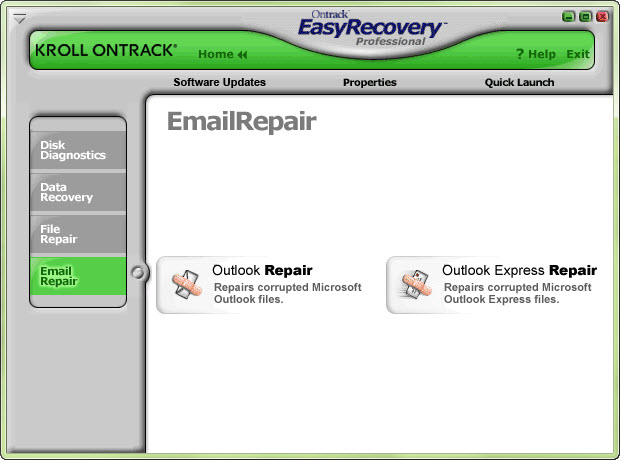
EasyRecovery(TM) Professional 6.0 is the complete solution for your data recovery, file repair, and disk diagnostic needs. It includes all of Kroll Ontrack’s EasyRecovery Data Recovery(TM) and EasyRecovery FileRepair(TM) features and benefits, plus superior disk diagnostics including Ontrack Data Advisor(R), and advanced data recovery capabilities and options. EasyRecovery Professional contains advanced data recovery capabilities that allow you to search more than 225 different file types including MIDI music files, voice files, digital media files, and more! Plus you can utilize the Emergency Boot Diskette to recover data from systems that cannot boot to Windows. In addition to the new, more powerful data recovery engine, EasyRecovery Professional now has the power to repair Zip files and Microsoft(R) Outlook(R), Access, Excel, PowerPoint(R) and Word files! Plus the added disk diagnostic features, including Ontrack Data Advisor(R), provide valuable system diagnostic tools to quickly evaluate the health of your hard drive.


Tuesday, 19 July 2005

RAR Password Recovery


ITUOnline Editors' review


RAR Password Recovery proved to be an effective way to uncover lost or forgotten passwords, but--as its name implies--it only works with one file type. Its straightforward, tabbed interface clearly represents the three main password recovery options: Brute-Force, Booost-Up, and Dictionary. Each approach proved successful in our tests, although the demo limits passwords to three characters. Conveniently, you can save password recovery settings in projects for future use. While it can only handle one file format, users who need to unlock their RAR files will find this application up to the task.

Publisher's Description

From Intelore:

RAR Password Recovery is a powerful tool to recover lost or forgotten passwords for a RAR/WinRAR (2.xx and 3.xx) archives. The program supports the "brute-force" attack, dictionary-based attack, and dramatically fastest "Booost-Up" attack. The program is able to resume the previous interrupted attack.
Version 1.1 RC16 may include unspecified updates, enhancements, or bug fixes.