Saturday, 26 May 2012

Windows Server 2003

Publisher's Description

From Microsoft:

Windows Server 2003 (sometimes referred to as Win2K3) is a server operating system produced by Microsoft, released on April 24, 2003. An updated version, Windows Server 2003 R2, was released to manufacturing on December 6, 2005. Its successor, Windows Server 2008, was released on February 4, 2008.


According to Microsoft, Windows Server 2003 is more scalable and delivers better performance than its predecessor, Windows 2000.

The following features are new to Windows Server 2003:
    Internet Information Services (IIS) v6.0
    Significant improvements to Message Queuing
    Manage Your Server – a role management administrative tool that allows an administrator to choose what functionality the server should provide
    Improvements to Active Directory, such as the ability to deactivate classes from the schema, or to run multiple instances of the directory server (ADAM)
    Improvements to Group Policy handling and administration
    Provides a backup system to restore lost files
    Improved disk management, including the ability to back up from shadows of files, allowing the backup of open files.
    Improved scripting and command line tools, which are part of Microsoft's initiative to bring a complete command shell to the next version of Windows
    Support for a hardware-based "watchdog timer", which can restart the server if the operating system does not respond within a certain amount of time.[3]

The ability to create rescue disk was removed in favor of Automated System Recovery (ASR).

Editions
Windows Server 2003 comes in a number of editions, each targeted towards a particular size and type of business.In general, all variants of Windows Server 2003 have the ability to share files and printers, act as an application server, and host message queues, provide email services, authenticate users, act as an X.509 certificate server, provide LDAP directory services, serve streaming media, and to perform other server-oriented functions.

Web

Windows Server 2003 Web is meant for building and hosting Web applications, Web pages, and XML web services. It is designed to be used primarily as an IIS 6.0 Web server and provides a platform for developing and deploying XML Web services and applications that use ASP.NET technology, a key part of the .NET Framework. Terminal Services is not included on Web Edition. However, Remote Desktop for Administration is available.. Only 10 concurrent file-sharing connections are allowed at any moment. It is not possible to install Microsoft SQL Server and Microsoft Exchange software in this edition without installing Service Pack 1. Despite supporting XML Web services and ASP.NET, UDDI cannot be deployed on Windows Server 2003 Web. The .NET Framework version 2.0 is not included with Windows Server 2003 Web, but can be installed as a separate update from Windows Update.


Windows Server 2003 Web supports a maximum of 2 physical processors and a maximum of 2GB of RAM.However, an instance of Windows Server 2003 Web cannot act as a domain controller.It is the only edition of Windows Server 2003 that does not require Client Access Licenses when used as the internet facing server frontend for Internet Information Services and Windows Server Update Services. When using it for storage or as a backend with another remote server as the frontend, CALs may still be required.


Wednesday, 16 May 2012

GetDataBack for NTFS


Publisher’s Description

From Runtime Software:
GetDataBack is highly advanced data-recovery software that will help you to get your data back when your drive’s partition table, boot record, Master File Table, or root directory is corrupted or lost, when a virus hits the drive, when files have been deleted, when the drive has been formatted, or when the drive has been struck by a power failure. GetDataBack can even recover your data when the drive is no longer recognized by the operating system or not only the root directory but all directory information is lost. Advanced algorithms will make sure all directories and subdirectories are put together as they were, and that long filenames are reconstructed correctly. GetDataBack is safe because it’s read-only, which means the program will never attempt to write to the drive you’re about to recover.

ITUOnline Editors’ review

Accidentally deleted your files? GetDataBack Data Recovery can track them down–for a price. It even works with corrupted drives and those not recognized by Windows. This version only recovers files from NTFS drives, but it does offer a search tool for quickly locating a file by its date, name, or size.

If you suspect your actual disk is about to bite the dust, you can create a drive image to use during recovery. The utility can’t make rescue discs, however, so if you want to do that, you’ll need to build yourself a bootable Windows PE disc and add GetDataBack Data Recovery to it–the publisher’s Web site has instructions.

Although the application proves quite adept at locating deleted files, and you can view their contents, the demo won’t recover them. We can’t vouch for how well this core feature works. GetDataBack Data Recovery seems worth trying, but if you actually want to recover any lost work, this demo won’t do you much good.

Saturday, 28 April 2012

DAEMON Tools Lite


Publisher’s Description

From Disc Soft:

DAEMON Tools Lite is a virtual DVD-ROM emulator based on a SCSI miniport driver. It emulates max. 4 DVD-ROM drives and works with CD/DVD images created by many burning programs. It is great on notebooks without a physical CD-/DVD-ROM drive or to save akku power and speed up CD/DVD access. In opposite to other CD-/DVD-ROM emulators DAEMON Tools Lite doesn’t use a proprietary container format. The advantage is that you can burn the images you’re using with DAEMON Tools Lite right away or just test an image before burning it to see if it was created correctly. DAEMON Tools Lite works with most image formats. Moreover it has a special feature to make physical (burned) backups of your CD / DVD images when it is possible. It supports Alcohol120%-Images (MDS-Files) and RMPS-Media. It’s also great if you want save Power on your Notebook.


What’s new in this version: Version 4.45.4 offers support of APE image files; DT as a new virtual device is added to perform Basic Emulation; Improvement of portable installation; SPTD 1.78.

Tuesday, 24 April 2012

Microsoft Security Essentials


Publisher’s Description
From Microsoft:


With Microsoft Security Essentials, you get high-quality protection against viruses and spyware, including Trojans, worms and other malicious software. Security Essentials is easy to install and easy to use. Updates and upgrades are automatic, so there’s no need to worry about having the latest protection. It’s easy to tell if you’re protected – when the Security Essentials icon is green, your status is good. It’s as simple as that.
When you’re busy using your PC, you don’t want to be bothered by needless alerts. Security Essentials runs quietly in the background, only alerting you if there’s something you need to do. And it doesn’t use a lot of system resources, so it won’t get in the way of your work or fun.
ITUO Editors’ review
The bottom line: Microsoft Security Essentials 2 will protect you, and it will generally do it well. However, its impact on system performance could be improved, and it’s still a bit light in the tool belt.
Review:
Now in its second iteration, Microsoft Security Essentials (MSE) debuted as the lightweight, cloud-based successor to the paid security suite Live OneCare in 2009. Version 2 introduces deeper hooks into Internet Explorer and the default firewall in Vista and Windows 7. Security Essentials has begun to mature, although it’s still rough at the edges.
Installation
It takes very little effort to get going with MSE. Microsoft politely does not opt you in to the program’s customer experience improvement program; you must choose to opt in or stay out of it before you can finish the installation. It also lets you choose whether to run the Windows Defender firewall, and whether to run a scan once installation is complete, although both of those are opt-out.
Overall, the installation time ran around 4 minutes on our test computer. That’s not as blazing fast as some of the paid suites, which can complete installation in less than 60 seconds, but it is respectable for a free program.
Interface
MSE 2′s interface adopts a different color scheme than the previous version, going for various shades of gray to replace the vibrant blue and white look. It doesn’t pop as much, but it also looks far less like a Windows XP relic.
For those unfamiliar with the design, MSE has four tabs across the top. The Home tab contains your security status and scan options, and you can run a Quick Scan, Full Scan, or Custom Scan. A link at the bottom of the pane lets you change the scheduled scan.
The second version of Microsoft Security Essentials changes its plumage to gray, and adds better heuristic detections and deeper hooks into the Windows firewall.
Update is where you manually get new virus definition files and program upgrades, History logs only detected threats, and Settings is where you go for advanced tweaking. The program looks simple, but don’t be deceived: there are quite a few advanced options in Settings–just not as many as many competitors offer. Security Essentials uses labels imported from OneCare: green for all good, yellow for warning, and red for an at-risk situation.
Features and support
Under the clean and uncluttered interface, Security Essentials wraps up antivirus and antispyware engines, rootkit protection, and real-time detection courtesy of Microsoft SpyNet, the unfortunately named cloud-based service that anonymously compares file behavior across computers running various Microsoft operating systems.
SpyNet was introduced in Windows Vista and extended to Windows 7, but Microsoft Security Essentials is the only way to access the network in Windows XP. Unlike other security vendors that allow customers to take advantage of the benefits of their behavioral detection engines while opting out of submitting information, there’s no way to do that with SpyNet.
Well, it’s mostly anonymous. You can choose between two SpyNet memberships. The basic membership submits to Microsoft the detected software’s origins, your response to it, and whether that action was successful, and the advanced membership submits all that plus the location on your hard drive of the software in question, how it operates, and how it has affected your computer. Both basic and advanced versions warn users that personal data might be “accidentally” sent to Microsoft, although they promise to neither identify nor contact you. New in version 2 is the option to opt out of contributing to SpyNet while still receiving the benefits of crowd-sourced security.
When you install MSE 2, it will automatically run a scan unless you opt out. Note that it will not consider your computer secure until that first quick scan has completed.
Microsoft Security Essentials 2 uses both definition-file and real-time defenses against viruses and spyware, and also offers rootkit protection. Along with the quick scan and the full scan, there’s a Custom scan option that lets users select specific folders or drives to scan. It doesn’t allow for customizing the type of scan used. For example, you’re not going to be able to choose to scan only for rootkits or heuristics, as you can with other security programs. However, you can set USB keys and other external devices to automatically get scanned. The program installs a context-menu option for on-the-fly scanning in Windows Explorer, too.
The Update pane manages the definition file updates, with a large action button, and History provides access to a spreadsheet-style list of All detection items, your Quarantine, and items you’ve Allowed to run. Although it’s a basic layout, this no-frills approach to security has proven appealing to people who are overwhelmed by more detailed security choices.
New in version 2 is integration with Internet Explorer so that downloads get scanned, and Windows firewall hooks so that your personal security net is tighter. For Windows 7 and Vista users, the Windows Filtering Platform that those two operating systems come with gets a boost from a new network inspection feature.
The Settings window allows you to further customize the program by scheduling scans, toggling default actions to take against threats, adjusting real-time protection settings, creating whitelists of excluded files, file types, and processes, and choosing from the aforementioned SpyNet options. There’s also an Advanced option that is still fairly basic: here you can set Security Essentials to scan archives and removable drives, create a system restore point, and expand user rights to allow all users to view the History tab.


A nice feature in the scheduler forces MSE 2 to be respectful of your computer’s processor usage.

Security Essentials comes preconfigured to run a scan weekly at 2 a.m., when Microsoft thinks your system is likely to be idle. New malware signatures are downloaded once per day by default, although you can manually instigate a definition file update through the update tab. Attachments and downloaded files will be automatically scanned by Security Essentials.

Help is only available in the form of the standard offline Help manual that comes with all Microsoft programs. There’s nothing fancy here.

MSE abandons the additional heft of a firewall, performance tuning, and backup and restore options to focus on core security. However, the new version does include a system restore option, to back up your computer before you remove any detected malware. Most of the changes in MSE 2 are under the hood, but it’s still a worthwhile program in terms of features, especially on lower-powered Netbooks.

Performance
Microsoft Security Essentials occupies a slightly different space than the rest of the security programs because it’s the only one published by Microsoft, and, remarkably to some, it doesn’t suck.

AV-Test.org certified MSE 1 during one test this year, and then refused to certify it during a test several months later. When tested on Windows 7 in the second quarter of 2010, MSE 1 earned certification with a 15 out of 18 score. It achieved 4 out of 6 in the Protection category, 4.5 out of 6 in Repair, and 5.5 out of 6 in Usability, where the minimum required for certification was 12. However, when tested on Windows XP in the third quarter of 2010, AV-Test.org did not pass MSE 1. The program earned 3 out of 6 in both Protection and Repair, and 5.5 out of 6 in Usability. Given the more advanced native security in Windows Vista and Windows 7, this could indicate that Microsoft’s own security program is unsuitable for its older operating systems.

On the other hand, AV-Comparatives.org awarded MSE 1 an Advanced+ certification in November 2010 for its retrospective/proactive test, finding the program to have very few false positives.

Those results don’t come cheaply, as far as system performance is concerned. Benchmarks put MSE 2 at the far slower end of the scale, with a bigger impact on system performance in general than most other security options. System start-up was 11.5 seconds slower than on an unprotected PC, and system shutdown was more than 6 seconds slower whereas most suites affected the system by 2 to 4 seconds.

MSE 2′s impact on the MS Office, iTunes decoding, media multitasking, and Cinebench tests was generally unimpressive. The program did very well in the Cinebench test, but in others its results were more middle-of-the-road.

Virus scan times were also slow compared with the competition. MSE 2 took 26 minutes to finish a full scan, and nearly 2 hours on a real-world computer. The 2-hour time is slow, although not the slowest out there. The first quick scan performed at installation took 4 minutes, which is a competitive time for that type of scan.

Conclusion
Security Essentials is basically a good set-it-and-forget-it security program.


Thursday, 29 March 2012

ITU Online |Home


ITU ONLINE is place where you will find ITU ONLINE Softwares.ITU Online Software’s are provided here.ITU ONLINE Software’s are registered OR Cracked.ITU Online is place where you can search ITU ONLINE Books and Magazines.ITU ONLINE is a place where you will find WEB Designing and Development Tools and Tutorials.ITU ONLINE is a place where you can search Office Management tools.ITU ONLINE is a place where you will find Online TV Channels.

Recommend this Article on Facebook/Google+/Twitter.


Step 1:-


Step 2:-


Saturday, 11 February 2012

Twitter Stream


Thursday, 8 September 2011

utorrent


Publisher's Description

From BitTorrent:


uTorrent is a powerful and efficient BitTorrent client for Windows. Most of the features present in other BitTorrent clients are present in uTorrent, including bandwidth prioritization, scheduling, RSS auto-downloading, and Mainline DHT. Additionally, uTorrent supports the protocol encryption joint specification and peer exchange. Unlike many torrent clients, it does not hog valuable system resources--typically using less than 6MB of memory, allowing you to use the computer as if it weren't there at all.

ITUOnline Editors' review


Small enough to run off a USB key, but powerful enough to download any torrent in a jiffy (if it's got enough seeders), uTorrent 2.0 is easy on the eyes and smart on your network. The memory footprint for uTorrent is very small, and system resources are barely touched. While you're torrenting, you shouldn't be surprised to find that other programs that use your Internet connection slow down, but the latest version of uTorrent has an answer to that. Called uTorrent Protocol, or uTP, it's a built-in throttling that detects network congestion and slows down the torrent until the traffic jam has dissipated.
Version 2.0 includes a transfer cap, so that users who have had limits imposed by their ISPs can keep track and automatically kill torrenting when that limit is reached. Skins have also been introduced, but there's no skins option in Preferences: instead, you must go to the uTorrent site and download and install them yourself. That's unnecessarily irritating.
The most difficult aspect of using a torrent client is still finding the torrents, but included are both a torrent search bar and a handy RSS feed download function. Subscribe to select feeds, and uTorrent automatically downloads files as they publish. Adding, starting, pausing, and listing torrents takes merely a click each. A speed guide helps you test your ports and adjust system settings for optimal performance, although watch out for the opt-out Ask.com toolbar when you install. Combined with Local Peer Discovery and DHT Network options, and Teredo and Ipv6 support, uTorrent should be the torrent program of choice for novices, intermediate, and advanced users.

Sunday, 24 July 2011

Norton Ghost


Publisher's Description

From Symantec:

Norton Ghost is a comprehensive disk imaging solution for home and small office users. Enhanced with Drive Image technology, which Symantec obtained through the acquisition of Power-quest Corporation, Norton Ghost offers consumers the ultimate solution in data storage and protection with a complete, reliable, quick and easy way to backup system files, programs, settings, documents and other important data.

With Norton Ghost, users can now create backup images without restarting their computer or exiting Windows through the product's hot imaging technology. Imaging takes place in the background without interruption, allowing users to continue work on their system as the backup takes place. Users also benefit by saving valuable time and storage space with Norton Ghost's incremental backup and restore feature. Once an initial image of a hard drive is completed, users can make future backups incrementally - updating only the files and information that have changed rather than backing up the entire hard drive again. In the event it is necessary to restore data, users can choose to restore the entire system or just specific files or folders.

Sunday, 6 March 2011

7-Zip


Publisher’s Description

From 7-Zip Software:


The main features of 7-Zip: High compression ratio in new 7z format with LZMA compression. Supported formats: Packing / unpacking: 7z, ZIP, GZIP, BZIP2 and TAR; Unpacking only: ARJ, CAB, CHM, CPIO, DEB, DMG, HFS, ISO, LZH, LZMA, MSI, NSIS, RAR, RPM, UDF, WIM, XAR and Z. For ZIP and GZIP formats 7-Zip provides compression ratio that is 2-10 % better than ratio provided by PKZip and WinZip. Self-extracting capability for 7z format. Integration with Windows Shell. Powerful File Manager. Powerful command line version.
ITUO Editors’ review

It’s easy for Windows users to forget that WinZip isn’t the only file-compression utility in the world. Like its better-known competitors, the free 7-Zip unpacks a host of archive formats, including ZIP, TAR, GZ, and its own 7z format. Unlike WinZip, though, it can create TAR and GZ archives, which are commonly used on Unix and Linux systems.

The program’s ability to shrink files was stunning. In our tests, 7z archives were up to 40 percent smaller then their ZIP equivalents, although compression did take longer, and the highest compression settings can hog system resources. Advanced options include the ability to create solid and self-extracting archives, and to adjust the compression level and password protection. The program also has a command line module. Though the main interface is overly simple and looks like it was designed for Windows 95, it’s not hard to use and fairly self-explanatory. The context menu options, which include “testing” an archive, indicate that 7-Zip should be taken seriously.

7-Zip is fine for casual users with a bit of computer savvy, but it’s especially well-suited for developers and anyone else who moves between the Windows and Linux/Unix worlds.

Sunday, 21 February 2010

Magic ISO Maker


Publisher's Description

From MagicISO:


MagicISO Maker is a CD/DVD-image-file editor, CD/DVD burner, and CD/DVD-backup tool. It can directly create, edit, extract, and burn ISO files. It also can convert almost all CD and DVD image formats to ISO and BIN/CUE. With MagicISO, you can handle DVD images up to 10GB; make CD/DVD-image files from CD-ROMs and DVD-ROMs; and burn ISO files and other CD and DVD image files (BIN, IMG, CIF, NRG, BWI, VCD) to CD-R/RW, DVD-/+R/RW,DVD-/+R DL. MagicISO supports the making of bootable CD and DVD image files; the loading of boot-image files exported by WinISO the creation of multi-bootable CD and DVD image files by a bootable setup wizard. Writing of floppy disk image onto floppy disk, and burning CD/DVD image file to CD and DVD on Command Lines. It can create/open/edit/extract/burn APPLE HFS/APPLES HFS+ disk image; supports DMG disk image; Can create and continue multisession DVD+R DL; It compresses and encrypts ISO image; creates virtual CD/DVD-ROM; mounts CD/DVD image as virtual CD/DVD.
Version 5.5 Build 276 can open/extract/convert GBI file. Can open/extract Blu-Ray ISO file.
What's new in this version: Version 5.5 build 281 supports disk image with NTFS and EXT partitions.

Friday, 23 October 2009

Windows 7 USB/DVD Download Tool


Publisher's Description

From Microsoft:

When you purchase Windows 7 from Microsoft Store, you have the option to download an ISO file or compressed files. The Windows 7 USB/DVD Download tool allows you to create a copy of your Windows 7 ISO file on a USB flash drive or a DVD. To create a bootable DVD or USB flash drive, download the ISO file and then run the Windows 7 USB/DVD Download tool. Once this is done, you can install Windows 7 directly from the USB flash drive or DVD.

The ISO file contains all the Windows 7 installation files combined into a single uncompressed file. When you download the ISO file, you need to copy it to some medium in order to install Windows 7. This tool allows you to create a copy of the ISO file to a USB flash drive or a DVD. To install Windows 7 from your USB flash drive or DVD, all you need to do is insert the USB flash drive into your USB port or insert your DVD into your DVD drive and run Setup.exe from the root folder on the drive.
Note: You cannot install Windows 7 from the ISO file until you copy it to a USB flash drive or DVD with the Windows 7 USB/DVD Download tool and install from there.
The copy of the ISO file that the Windows 7 USB/DVD Download tool creates is bootable. Bootable media allows you to install Windows 7 without having to first run an existing operating system on your machine. If you change the boot order of drives in your computer's BIOS, you can run the Windows 7 installation directly from your USB flash drive or DVD when you turn on your computer. Please see the documentation for your computer for information on how to change the BIOS boot order of drives.
You may make one copy of the ISO file on a disc, USB flash drive or other media in order to install the software on a computer. Once you have installed the software on a computer, the license terms that accompany the software apply to your use of the software and replace these terms. The license terms for Windows 7, once accepted, permit you to make one copy of the software as a back-up copy for reinstallation on the licensed computer. If you do not delete the copy of the ISO file you made to install the software on your computer, then the copy of the ISO file constitutes your back-up copy.

Thursday, 23 October 2008

Inpage 2000

ITUOnline Editors’ review

is a page layout software for languages such as Urdu, Persian, Pashto and Arabic under Windows which was first developed in 1994. It is primarily used for creating pages in the language of Urdu, using the Nasta`līq (نستعلبق) (‘hanging’ calligraphic) style of Arabic script.


As a de facto standard Urdu publishing tool, InPage is widely used on PCs where the user wishes to create their documents in Urdu, using the authentic style of Nastaliq with a vast ligature library (more than 20,000), while keeping the display of characters on screen WYSIWYG (What-You-See-Is-What-You-Get). Overall, this makes the on-screen and printed results more ‘faithful’ to hand-written calligraphy than all or most other Urdu software on the market. This is achieved while keeping the operation easy, akin to that of earlier versions of standard English Desktop Publishing packages such as QuarkXPress and Adobe InDesign.
Before being used within InPage, the Noori style of Nastaliq, which was first created as a digital typeface (font) in 1981 through the collaboration of Mirza Ahmad Jamil TI (as calligrapher) and Monotype Imaging (formerly Monotype Corp.), suffered from two problems in the 1990s: a) its non-availability on standard platforms such as Windows or Mac, and b) the non-WYSIWYG nature of text entry, whereby the document had to be created by commands in Monotype’s proprietary page description language.
In 1994, an Indian software development team – Concept Software Pvt Ltd,[1] led by Rarendra Singh & Vijay Gupta, with the collaboration of a UK company called Multilingual Solutions [2] led by Kamran Rouhi, developed InPage Urdu for Pakistan’s newspaper industry, who up until that time had been using large teams of calligraphers to hand-write last minute corrections to text created under Monotype’s proprietary system. The Noori Nastaliq typeface was licensed for InPage from Monotype & augmented for use as the main Urdu font in this software, along with 40 other non-Nastaliq fonts which were created by Syed Manzar Hasan from Axis Softmedia Pvt Ltd.[3]
InPage is reported to be in use on millions of PCs in Pakistan & India (mainly illegal pirated version). It has also been widely marketed & sold legally in the UK and India since 1994, and is utilized in the majority of UK schools & local authorities where Urdu is a main language of pupils & constituents.[citation needed]
InPage launched its latest Version 3 at ITCN exhibition Asia in Karachi, Pakistan, held between 11–13 August 2008.[4] It is now Unicode based, supports more Languages, and Faiz Lahori Nastaliq font with Kasheeda has been added to it along with compatibility with OpenType Unicode fonts. In addition to Arabic, Saraiki, Urdu, Persian & Pashto, other languages of the region, such as Sindhi and Hazaragi can be handled in InPage.
[edit]References


Friday, 3 March 2006

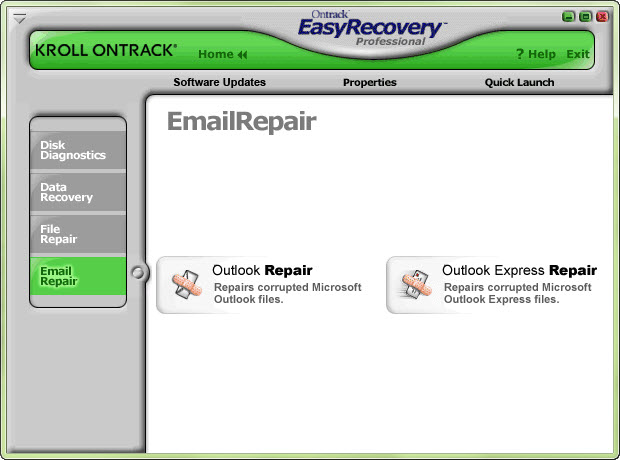
Easy Recovery Pro


Publisher’s Description

From Kroll Ontrack:
EasyRecovery(TM) Professional 6.0 is the complete solution for your data recovery, file repair, and disk diagnostic needs. It includes all of Kroll Ontrack’s EasyRecovery Data Recovery(TM) and EasyRecovery FileRepair(TM) features and benefits, plus superior disk diagnostics including Ontrack Data Advisor(R), and advanced data recovery capabilities and options. EasyRecovery Professional contains advanced data recovery capabilities that allow you to search more than 225 different file types including MIDI music files, voice files, digital media files, and more! Plus you can utilize the Emergency Boot Diskette to recover data from systems that cannot boot to Windows. In addition to the new, more powerful data recovery engine, EasyRecovery Professional now has the power to repair Zip files and Microsoft(R) Outlook(R), Access, Excel, PowerPoint(R) and Word files! Plus the added disk diagnostic features, including Ontrack Data Advisor(R), provide valuable system diagnostic tools to quickly evaluate the health of your hard drive.


Tuesday, 19 July 2005

RAR Password Recovery


ITUOnline Editors' review


RAR Password Recovery proved to be an effective way to uncover lost or forgotten passwords, but--as its name implies--it only works with one file type. Its straightforward, tabbed interface clearly represents the three main password recovery options: Brute-Force, Booost-Up, and Dictionary. Each approach proved successful in our tests, although the demo limits passwords to three characters. Conveniently, you can save password recovery settings in projects for future use. While it can only handle one file format, users who need to unlock their RAR files will find this application up to the task.

Publisher's Description

From Intelore:

RAR Password Recovery is a powerful tool to recover lost or forgotten passwords for a RAR/WinRAR (2.xx and 3.xx) archives. The program supports the "brute-force" attack, dictionary-based attack, and dramatically fastest "Booost-Up" attack. The program is able to resume the previous interrupted attack.
Version 1.1 RC16 may include unspecified updates, enhancements, or bug fixes.

Saturday, 1 December 2001

Microsoft Windows XP Home Edition


Publisher's Description

From Microsoft:

Windows XP Home Edition gives you the freedom to experience more than you ever thought possible with your computer and the Internet. This is the operating system home users have been waiting for because it offers serious speed and serious stability, so you can have serious fun.
What's new in this version:

Enjoy the new standard in dependability

  • Reliable and dependable
  • Easy to use
  • Fast and powerful
  • Secure and private

    Unlock the full potential of your personal computer

  • Create, share, and enjoy movies
  • Communicate any time, anywhere
  • Record and share memories with digital photos
  • Discover, download, store, and play music
  • Share all your home computing resources
  • Enjoy an all-in-one entertainment center